





Table of Contents
Have you ever wondered what happens to the parts of a signal that doesn’t make it through a traditional compressor? It’s okay if you haven’t – I haven’t really thought about this, either. But, now, as I think about it, I guess that signal just gets discarded. That is, unless you’re using Phantomix.
The latest plugin from the team at UnitedPlugins is a compressor with a twist: it takes signal, splits it, processes one half of that signal, and mixes it back into the final sound. All that signal that usually gets discarded? Now, it can be processed separately and mixed back in.
The way I see it, it looks like a multi-FX plugin mixed with a compressor. It also looks like a plugin that does makes it easier than ever before to properly compress and process sounds in one package. And, as someone who would rather spend more time writing music than mixing and processing it, this seems like a great thing to have in my arsenal.
Obviously, I got my hands on a copy. Before I get into my review, I want to shout-out this awesome walkthrough made by the UnitedPlugins team. In just under six minutes, the plugin is expertly broken down and explained in a manner far better than I ever could. Check it out, then read on to see my thoughts!
Layout
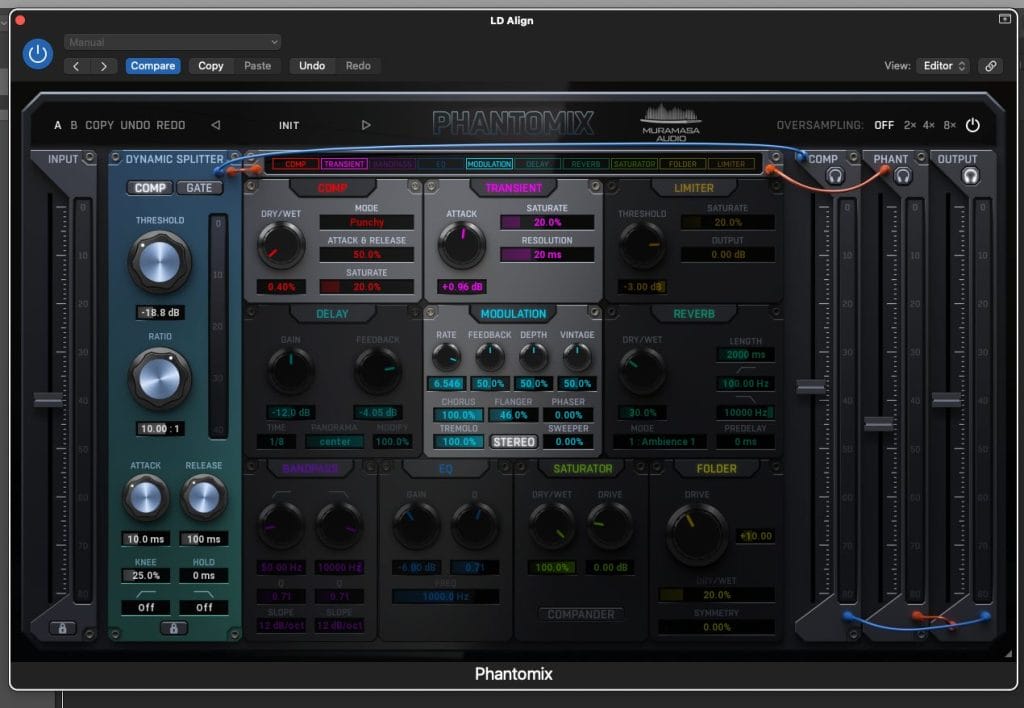
The big thing to note about the layout is that everything moves from left to right, and that the dynamic splitter is the most important part of the plugin by far. It operates as a normal compressor or gate, but throws the reduced signal into the FX chain in the middle.
Compression mode will process the loud parts of the sound that don’t make it past the threshold, whereas gate mode will process the quiet parts of the sound (and work in an exact opposite manner). To see what actually makes it through the compressor and what gets processed, you can click the handy headphones buttons under “COMP” and “PHANT” to hear exactly what’s going on.
The dynamic splitter also allows you to hone in on a specific frequency range by using the low cut and high cut options at the very bottom, making it very useful if you’d like to adjust a very specific part of your sound. Everything else operates like a normal compressor.
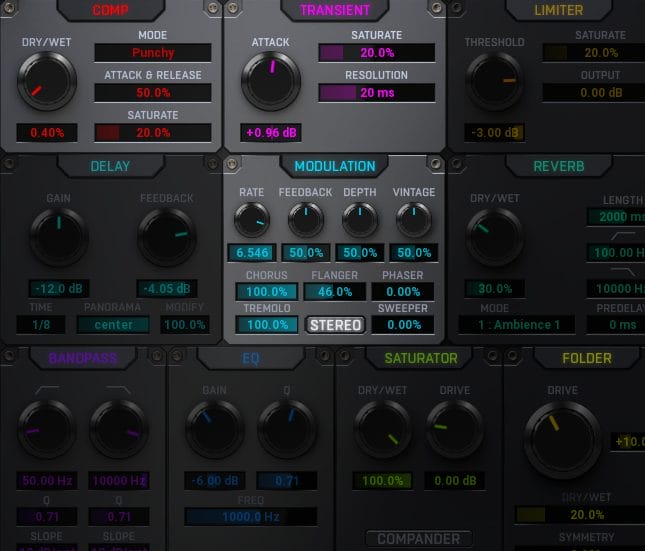
All of the FX modules in the middle are easily usable and pretty high quality. You’ve got everything you’ll need here – distortion, saturation, reverb, phaser/flanger/tremolo, compression, and more. Remember that these will only affect the sound that gets cut off by the dynamic splitter – but if you’d like to use Phantomix like a normal multi FX plugin, you can easily do that by adjusting the splitter so that ALL of the sound gets sent through the chain: just adjust the threshold knob all the way to the left or the right, depending on what mode you’re in.
After this all gets processed, you can mix together both the compressed sound and the “phantom” (the signal that ran through the effects chain) by using the level sliders on the right hand side, and then adjusting the output signal.

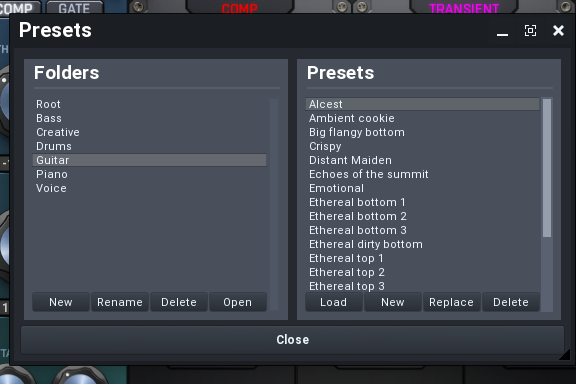
In the likely case that you have no idea where to start, you can also select from any of the numerous presets shipped with the base version. While each preset fits into a specific category of instrument (like piano or guitar), that’s just a suggestion: get creative with them!
That’s a base-level overview of using Phantomix. How is it in practice?
Results
It takes some getting used to, but once you’ve gotten ahold of the controls, this becomes a very powerful tool that goes beyond traditional compression.
Want to use it as a saturator that only affects the midrange? You can do that. How about a transient shaper that only affects a certain drum in a drum loop? That’s doable, too. Maybe as a guitar amplifier? Also very much possible. Referring to this plugin as compressor is selling it short: it’s an all-in-one processing machine that can do the work of five or ten other plugins.
Below is a quick demonstration I put together of three presets from Phantomix. They all use the same guitar sample, which plays at the start. You’ll hear just how this plugin can shape and change a sound into something entirely different – it’s doing things that traditional compressors just can’t do.
This is just the tip of the iceberg, by the way. You can get really into signal processing here and come up with some wild sound design possibilities. And, by only processing parts of the original signal, you can do it very cleanly and easily. You can get the best parts of your post-processing mixed in with the best parts of your original signal. There aren’t many tools out there that make it this easy.
Pros and Cons
Pros:
It takes the best parts of a compressor and a multi FX rack and combines them into one.
This is such a creative plugin that creates possibilities that simple compressors and FX racks couldn’t even dream of. You can do half the work and get results two times as good by just using this plugin.
It’s on a huge sale right now!
I normally don’t provide sales as cons, but this powerful tool is currently in an introductory sale for 76% off. A tool this good shouldn’t be that cheap – the price right now is just over 20 USD. If you want to get this tool, act fast before the price gets jacked back up!
It can be as simple or complex as you want.
Even beginners will be able to use this and get some great results out of it. You don’t have to be a sound design wizard and know what every knob does down to a T to benefit from having this plugin in your arsenal – though, it’s complex enough to where expert sound designers will find tons of joy in this plugin, as well.
Cons:
FX routing.
My biggest complaint here is that you can’t really decide in what order you can send signal through FX modules. Everything is just out there in the open, with no real flexibility. I’d like to see this addressed in a future update, with potentially a more modular look at FX processing. It’s not a dealbreaker, just something that I’d like to see addressed, as I’m pretty particular about in what order my FX modules are added on.
Conclusion: Should you get it?
If you’re looking for a new FX rack or a new compressor, this tool will make you very, very happy. It’s a true sound design beast that has quite a bit going for it, and definitely something worth looking into grabbing.
Get Phantomix here.
The post United Plugins Phantomix Review: The Best Parts of a Compressor & an FX Rack In One Package appeared first on Magnetic Magazine.